
Gameram: Find gaming teammates
GAMERAM LTDSocial
4.5996.00 Reviews
- Version
- 1.134.0
- Installs
- 5.00M
- Age Rating
- Teen
Screenshots
Our Review of Gameram: Find gaming teammates
 Analysis by Appyee
Finding reliable gaming teammates is often harder than finding a game to play. I have spent enough time waiting in random matchmaking, joining conversations that move too quickly, and trying to explain my preferred play style to strangers to appreciate what Gameram is trying to solve. This social app from GAMERAM LTD is built around helping players meet other players, make friends, and share gaming experiences rather than treating every connection as a one-off match.
My first impression is that Gameram feels most useful when I approach it as a community-finding tool, not as a replacement for a game’s own matchmaking system. It gives the social side of gaming more attention: who I want to play with, what kind of interaction I enjoy, and whether I am looking for a regular group instead of another anonymous teammate. That distinction matters, especially for people who find conventional voice-chat spaces tiring, confusing, or difficult to enter.
The app is free to install and is listed for Teen users, with optional purchases ranging from $2.49 to $17.99 per item. It has built a substantial audience, with over five million installs and an average rating of 4.5 from around forty-four thousand ratings. Those figures suggest that the basic idea has connected with many players, although popularity alone does not guarantee that every search will produce a good match.
How Gameram handles readability and navigation
I find readability and navigation most useful when they help me make one decision at a time: whether a player’s preferences fit mine, and whether I want to start a conversation. That focused approach can keep browsing manageable, while a brief pause between profiles helps me avoid choosing based on a quick impression alone. The next section looks at how different ways of seeing, moving, and communicating can shape that experience.
A social starting point instead of a game-first dashboard
Gameram’s central appeal is easy to understand: I can use it to look for people who want to play and chat, rather than depending entirely on whoever happens to appear in a game lobby. That makes the app easier to evaluate than a platform with a vague social purpose. If my goal is to find a teammate, build a small circle, or share gaming-related experiences, I know what kind of activity the app is meant to support.
That clarity is particularly helpful for new users. A person who is not comfortable entering large gaming communities does not necessarily need another complicated hub filled with unrelated channels. A focused social app can reduce the first decision to something practical: explore people, present myself, and start a conversation. In my experience, that is a better starting point than immediately being dropped into a crowded stream of messages.
Still, the usefulness of any people-finding app depends on how much information is visible before I commit to a conversation. A short profile can be quick to scan, but it may not tell me enough about communication preferences, availability, experience level, or the kind of group someone wants. A longer profile can be more informative, but it also asks users to spend more time reading. This is an important trade-off for anyone who processes information slowly or prefers predictable choices.
Making profiles work harder
One practical approach is to treat my profile as a filter rather than a personal advertisement. I would state the games or genres I am interested in, the kind of teammate I want, and whether I prefer relaxed sessions or more focused play. I would also mention communication expectations in plain language. A profile that says “I prefer short messages and a calm group” gives a potential teammate something useful to respond to, while a generic statement about liking games does very little.
This is one of the app’s less obvious strengths: the social outcome can improve when I do some of the sorting before I start messaging. Gameram can introduce people, but it cannot automatically turn an unclear profile into a compatible friendship. The more specific I am about what I need, the less time I waste in conversations that were unlikely to work.
For users who find dense interfaces difficult, I would recommend exploring the app in short sessions. Rather than trying to read every profile and conversation at once, I can look for a few promising contacts, save the details I need mentally or elsewhere, and return later. That approach also reduces the pressure to answer several people immediately.
Where navigation may feel less comfortable
Social discovery is naturally less predictable than a single-purpose utility. New profiles, changing conversations, and different communication styles can make the experience feel open-ended. That is useful for meeting people, but less comfortable for someone who wants a fixed sequence of steps and a clear endpoint.
I would not choose Gameram expecting the strict structure of a calendar, a task manager, or a game lobby with only a few defined buttons. Its value comes from browsing and interaction, so some uncertainty is part of the experience. Users who prefer highly controlled navigation may need to set personal limits: decide how long to browse, how many conversations to begin, and when to stop for the day.
The app’s current version is 1.134.0, and it requires at least iOS 11 or a later compatible system. Keeping the operating system and app current is sensible for any social service, especially when an older device may make text, transitions, or multitasking feel less comfortable. I would check compatibility before planning to use it on an older phone.
Motor, sensory, and communication considerations
I would treat communication style as part of teammate compatibility, not as a minor detail to sort out after agreeing to play. A short written exchange can give both people room to set expectations, though reading and typing may still take effort for some users. Those considerations lead naturally to the practical question of when Gameram is easiest to use and when another moment or setting may work better.
Why text-based discovery can help
Gameram’s social purpose may suit people who do not want to rely on instant voice communication. Looking for a teammate through profiles and messages gives me more time to understand who I am speaking with and decide whether the interaction feels appropriate. That can be valuable for users who are hard of hearing, who find live conversation exhausting, or who simply communicate better in writing.
It can also help players who need a slower introduction to a group. Joining a voice channel full of experienced players can be intimidating, particularly when everyone already seems to know one another. A written exchange offers a softer first step. I can explain my preferences, ask a direct question, and decide whether to continue without having to perform socially at full speed.
That does not make the app automatically accessible for every communication style. Text still requires reading, typing, and interpreting tone. Short messages can be ambiguous, while long conversations can become tiring. Someone who uses assistive input, speech-to-text, a screen reader, or enlarged text may have a workable experience depending on the device and operating system, but I would not assume that every part of the app is equally comfortable with every setup.
Reducing motor effort in everyday use
Finding a teammate can become repetitive: open a profile, read it, move to another profile, type a message, then return to check replies. For users with limited hand movement, tremors, or fatigue, this repeated tapping and typing may be more demanding than the social idea suggests. A helpful habit is to prepare a short introduction that can be adapted instead of rewritten from scratch each time.
For example, I might keep a simple message such as: “I am looking for a relaxed session and prefer clear, short messages. What kind of group are you hoping to find?” It is specific enough to start a useful conversation without requiring a long explanation. This is not a feature of Gameram itself; it is a workflow that makes the app less physically demanding and helps me compare responses more easily.
Users with limited dexterity should also avoid treating every notification as urgent. Social apps can encourage quick replies, but a teammate search usually improves when I answer at a pace I can sustain. Turning a casual search into a race creates unnecessary pressure and can lead to rushed choices about who to trust.
Visual and sensory comfort
Gaming communities often contain a lot of visual information, and social apps can become tiring when profiles, messages, and alerts compete for attention. I found that the most comfortable way to use this kind of service is to focus on one task at a time: search for a suitable person, read the profile carefully, then decide whether to message. Constantly switching between discovery and conversation makes it harder to notice important details.
People sensitive to notifications may want to be selective about when they check the app. The social value of Gameram does not require continuous availability. I can use it during a planned break, review replies, and leave rather than allowing every new interaction to interrupt a game, a class, work, or rest.
For low-vision users, text size, contrast, and the device’s accessibility settings will matter greatly. I would test the app with the phone’s preferred display settings before investing time in building a network. If reading profile text or distinguishing controls is uncomfortable, the app’s main purpose becomes difficult to reach, regardless of how good the community might be.
Using Gameram in different situations
I get the most from a teammate-finding app when I can give it my attention, rather than trying to browse while walking or rushing into a game. A planned check-in can make it easier to compare people calmly and reply at a comfortable pace. Different routines call for different approaches, so the following section considers how to adapt use without turning social discovery into another obligation.
A realistic teammate-search scenario
Imagine I usually play in the evening but my regular friends are unavailable. Instead of joining random matchmaking and hoping for a compatible group, I can open Gameram earlier in the day, describe the kind of session I want, and look for people with similar expectations. If I find someone who prefers the same pace and communication style, we can establish contact before the game begins.
The important difference is that the app gives me room to negotiate the social details first. I can ask whether the person wants a short session, whether they are comfortable with text, and whether they are looking for a recurring group. Those questions may seem small, but they prevent a common gaming problem: two people agreeing to play while imagining completely different experiences.
This workflow is also useful for people who need breaks or predictable schedules. I can be honest about when I am available instead of joining a group and leaving unexpectedly. That will not guarantee a perfect match, but it gives other players enough information to make a better decision too.
When the app is useful beyond competitive play
Although the idea of finding teammates naturally suits multiplayer gaming, I see a broader use for people who want gaming friends rather than only efficient partners. Someone who enjoys discussing games, sharing experiences, or learning from other players may prefer a social introduction before committing to a session.
This matters for newcomers and returning players. A person who has taken a long break may feel out of place in a highly competitive community. A conversation with another player can make it easier to ask basic questions without feeling judged. Similarly, someone who plays casually may use Gameram to find people who value conversation and cooperation more than winning every round.
That flexibility is a benefit, but it also means I need to state my intentions clearly. If I want a serious competitive group, I should say so. If I want a relaxed social session, I should say that instead. Ambiguous expectations are one of the fastest ways for a promising connection to become frustrating.
Situational access and device limitations
The app is most practical when I have enough time and attention to read profiles and hold a conversation. It is less suitable when I am walking, multitasking, or trying to make a last-second decision before a game starts. Social discovery is not a good activity for divided attention because a rushed message can create confusion or expose more personal information than intended.
The minimum operating-system requirement also affects who can use it comfortably. People with older devices may need to verify that their phone can run the app before relying on it as their main route to gaming communities. Even when installation is possible, an older handset may have a smaller display, slower performance, or less comfortable typing, all of which can make profile-based interaction harder.
Because the app is free to install, it is easy to try without an initial payment. The in-app purchases are worth treating carefully, however. I would first use the free experience long enough to understand whether the available community and interaction style suit me. Paying for extras before knowing whether I can find compatible teammates would be a poor trade-off.
Remaining barriers and practical cautions
I would keep expectations modest: finding players is a starting point, not a promise of an immediate or lasting match. Clear boundaries, careful sharing, and a willingness to step away from an uncomfortable conversation are sensible habits, especially for younger users. With those cautions in mind, the closing section weighs whether Gameram offers enough recurring value to justify a place in a player’s routine.
Discovery does not guarantee compatibility
The biggest limitation is built into the concept: Gameram can help me meet players, but it cannot guarantee that they will be respectful, available, reliable, or genuinely compatible. A good-looking profile may still lead to a disappointing conversation. I would judge people by how they respond to clear boundaries and simple questions rather than by enthusiasm alone.
New users should avoid sharing sensitive personal details too early. A teammate only needs enough information to understand gaming preferences and availability. I would keep the first conversations focused on games, schedules, and communication style, then move to deeper trust gradually. This is especially important for Teen users, who should involve a trusted adult if an interaction becomes uncomfortable or asks for private information.
Another barrier is community density. A large install base does not mean that the right players will be active at the exact time I search, interested in the same games, or located in a convenient time zone. If I need guaranteed immediate matchmaking, the game’s own queue or a large established chat platform may work better.
When another option is the better choice
I would choose a game’s built-in matchmaking when my priority is speed. I would choose a dedicated voice or community platform when I already know the group I want to join and need robust live communication. I would choose a general social network when gaming is only one of several interests I want to discuss.
Gameram makes the most sense in the space between those options. It is more intentional than anonymous matchmaking and more focused than a broad social feed. That focus is valuable for people who want to meet gaming friends, but it may feel too limited for users looking for extensive moderation controls, large public communities, or a complete communication suite.
Accessibility also changes the decision. If I need a very specific assistive technology workflow, I would test the exact functions I depend on before making Gameram my primary community. The app’s purpose is promising for slower, text-led introductions, but that should not be confused with a guarantee that every control, message, or profile is equally accessible in every situation.
Three habits that improve the experience
- Write a boundary-friendly profile: explain your preferred pace, communication method, and availability so compatible people can identify themselves quickly.
- Use a two-step conversation: begin with gaming interests, then ask one practical question about schedules or group expectations before arranging a session.
- Set a stopping point: decide how long to browse and how many conversations to start, especially if notifications, reading, or typing cause fatigue.
These habits are more important than simply collecting contacts. A large list of inactive or unsuitable connections does not help me play more comfortably. A smaller group with clear expectations is usually more useful, particularly for players who need predictable communication or regular breaks.
My inclusive verdict on Gameram
I see Gameram as a thoughtful answer to a real gaming problem: many players want companionship, but do not want to depend on random matchmaking or force themselves into a loud public community. Its social focus gives me a chance to explain what I am looking for before a session begins, which can make gaming more welcoming for newcomers, casual players, and people who prefer written communication.
Its strongest accessibility-related quality is the opportunity to slow down the first interaction. I can read, think, and decide instead of responding instantly. That may support players with different communication needs or limited tolerance for fast-moving voice spaces. The app can also work well for people who want to find a regular group without presenting themselves as highly competitive.
At the same time, I would not call it effortless. Profile browsing, typing, notifications, and uncertain social responses can create their own barriers. The experience depends heavily on the quality of the people I encounter and on how clearly I describe my needs. Users who require immediate matchmaking, a highly structured interface, or a fully specialized accessibility workflow may be happier with another platform.
For me, the best way to approach Gameram is as a patient introduction service for gaming friendships. I would install it for free, create a specific profile, test a few conversations, and wait before considering any optional purchase. With realistic expectations and sensible privacy boundaries, it can be a useful bridge between playing alone and joining a community that actually fits. Its real value is not simply finding more players; it is making the first step toward the right players less abrupt.
Verdict
Strengths of Gameram: Find gaming teammates
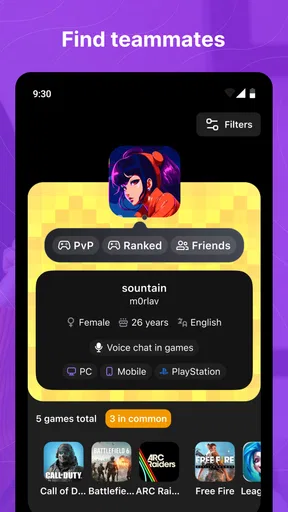
- Quickly find teammates who play the same games and platforms.
- Profile tags make it easier to match with compatible gaming styles.
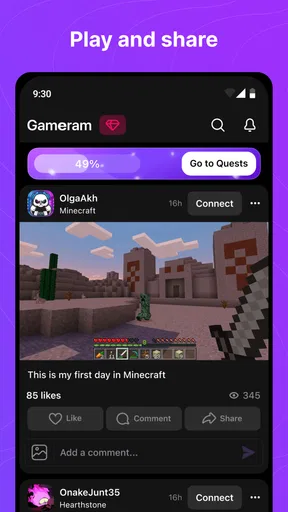
- Supports social interaction beyond individual game lobbies.
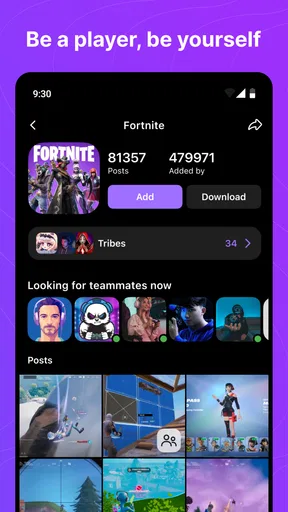
- Useful for discovering active gaming communities and new friends.
- Simple way to organize future sessions with people you meet.
Limitations of Gameram: Find gaming teammates
- The quality of matches depends heavily on how active your region is.
- Some users may be looking for different skill levels or play styles.
- Notifications can become distracting when conversations stay active.
- Finding reliable long-term teammates may require several trial matches.
- The app may feel less useful if your favorite game has a small community.
Similar Picks in This Category
View All
Meta Platforms, Inc.4.6

Instagram4.0

Likee-Live, Chat & Party Games
Likeme Pte. Ltd.4.4

Facebook Lite
Meta Platforms, Inc.4.5

TikTok - Videos, Shop & LIVE
TikTok Pte. Ltd.4.0

Moj: Free Short Drama & Reels
ShareChat4.1
Frequently Asked Questions
What is Gameram: Find gaming teammates?
Gameram is a social platform designed to help players find gaming teammates, make new connections, and organize multiplayer sessions. After creating a profile, you can discover people based on their preferred games, platforms, interests, and playing style. It is intended for users who want to expand their gaming community, find reliable partners, or simply meet other players for casual or competitive matches.
How does Gameram help me find suitable gaming teammates?
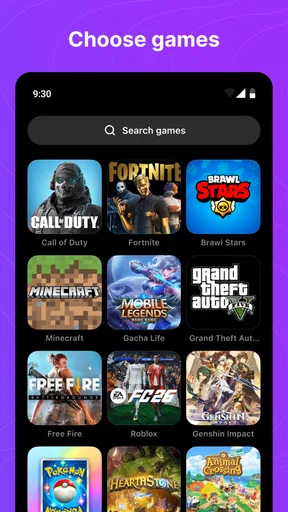
The app uses profile information and gaming preferences to make it easier to connect with compatible players. You can typically indicate the games you play, your platform, skill level, language, and preferred schedule. These details help narrow down potential teammates, while social features such as profiles, posts, chats, or communities can help you decide whether someone is a good match before joining a session.
Is Gameram free to download and use?
Gameram can generally be downloaded at no initial cost, allowing users to create a profile and explore its community features. However, availability of premium options, advertisements, subscriptions, or paid tools may depend on the current version and your region. Before downloading or subscribing, review the app-store listing and in-app purchase information carefully so you understand which features are free and which may require payment.
Is Gameram safe for chatting and meeting other players?
As with any social gaming application, safety depends on both the platform’s moderation tools and your own online habits. Avoid sharing sensitive personal information, passwords, payment details, or your exact location with people you have just met. Use blocking and reporting options when available, and be cautious with suspicious links or requests. Parents should also review privacy settings and supervise younger users.
Which devices and games are compatible with Gameram?
Gameram is intended for mobile users and may be available on Android and iOS, although supported operating-system versions can change over time. The app is primarily used to connect players around popular games rather than replace the games themselves, so compatibility depends on the titles and platforms represented in its community. Check the official store page for current device requirements and supported features before installing.
